
Doha Guides Team regularly reviews this article to ensure the content is up-to-date and accurate. The last editorial review and update were on 18 February 2025.
What Is Metrash App?
Metrash is a mobile application offered by the Ministry of Interior (MOI) in Qatar, designed to provide convenient access to a wide range of government services and information.
It allows residents and citizens of Qatar to conduct various administrative tasks and inquiries related to residency permits, visit visa applications, traffic violations, vehicle registration, and more, directly from their smartphones. With Metrash, users can access essential government services anytime, anywhere, reducing the need for physical visits to government offices and streamlining administrative processes.
This article explains the step-by-step process of Metrash registration, services available on the app and answers to frequently asked questions.
- What Is Metrash App?
- 2025 Update: MOI launches new Metrash App
- How To Register Metrash On Your Mobile Phone
- What Is Inside The Metrash App
- How To Activate The Metrash App On A Second Device
- How To Change Mobile Number In Metrash
- How To Deactivate Metrash On A Mobile Device
- How to enrol wife, children without registered phone numbers
- A Brief History Of MOI Qatar And Metrash App
- New Features of Metrash app
- Metrash Helpline
- FAQ on Metrash Mobile App
2025 Update: MOI launches new Metrash App
Qatar’s Ministry of Interior launched a new version of the Metrash app for smartphones, adding more services with fewer steps involved. The application with user-friendly design has been developed using latest technologies. There has been new payment methods added, including Apple Pay in the latest version of the app. The new app allows users to access a wide-range of services, allows personal authorisation, request and reprint certificates, and more.
The Ministry of Interior announced that the old Metrash2 app will be discontinued starting March 1, 2025. The Ministry urged users to download the new application from the App / Google Play store to continue accessing MOI e-services.

How To Register Metrash On Your Mobile Phone
Step 1. Download the Metrash app on your mobile phone
Go to App Store or Google Play Store and search for Metrash. Once you find it, click “Download” and then “Open”.
Step 2. Select your preferred language
By default, the app opens in Arabic. You can select your preferred language from the top right button. Metrash is available in Arabic, English, French, Spanish, Malayalam and Urdu.
Step 3. Enter your Qatar ID number
On the next screen, enter your Qatar ID number and click on “Login”. If this is your first time, you will be taken to the registration page.
Step 4. Enter your details
Enter your date of birth, mobile number, password, re-enter the password, and click on “Next”.
Step 5. Receive activation code via SMS
You would have received an activation code by SMS. Now you can log in to the app with your password and use Metrash. For the first time use, you have to accept the Terms and Conditions. Click on “Accept”.
NOTE: If you have registered on the old “Metrash2” app earlier, you can use the same password, or click on “Forgot password” during login.
What Is Inside The Metrash App
My Info Tab
The first tab has information related to your official documents like Qatar ID, Passport, Driving License and the last date you entered Qatar.
You can see the details of your family members under Residence Services in the second row. The third row has Traffic details like owned vehicles, traffic violations etc. The last row is for Visa Services. You can see more details if you click on each icon.
Services Tab
The second tab contains the following services:
Residency
On the “Residency” page, you can find options for Issue Residency Permit, Residency Cancellation, Residency Renewal, Replace Damaged or Lost ID, Sponsored Names Report, Re-issue RP, Change Passport Details, Sponsorship Change, Automatic RP Renewal etc.
Citizens
On the “Citizens” page, you can find various transactions needed by Qatari Citizens.
Traffic
On the “Traffic Services” page, you can find services like Driving License Renewal, Check Traffic Violations, Pay for Violations, Vehicle Ownership Transfer, Accident Registration etc.
General Services
This page has services like Report Lost Objects, Police Clearance Certificate, Security Permits etc.
Visa
Visa Page contains services like Issue New Visa, Visa Approval, Visa Extension, Visa Follow Up etc.
Leave Notification
The Leave Notification page has options for Leave Notification, Return Permit, Traveller Transaction etc.
National Address
This page is for registering National Addresses. All citizens and residents must register their residence address on Metrash.
Communicate With Us
This page has options to communicate with departments like CID, Traffic, Security Department etc. You can also report traffic violations through this page.
How To Activate The Metrash App On A Second Device
Metrash services can be activated on two devices. To activate the second device:
- Download the Metrash application on the second device.
- Enter QID and password used for the first device.
- The system will send One Time Password (OTP) valid for 10 minutes to the device used to activate Metrash.
- Enter the OTP password, and Metrash services will be activated on the second device.
How To Change Mobile Number In Metrash
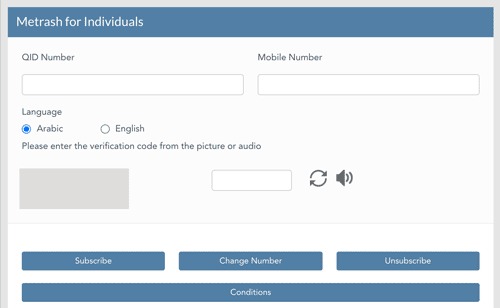
MOI Qatar Metrash is activated on a mobile number owned by your Qatar ID. If you need to change the default mobile number, follow these steps:
- Go to the Ministry of Interior Website
- Click on the “Inquiries” icon
- Go to Metrash Page
- Click on “Metrash for Individuals”
- Enter your QID and the new mobile number
- Click “Change Number”
You can also use the same page for Subscribe and Unsubscribe.
How To Deactivate Metrash On A Mobile Device
- Open the Metrash app
- Click on the top-right icon
- Scroll down to the last option named “Settings.”
- Click on “Deactivate”
- Enter the password (PIN)
In case the service is activated on different devices, you should select whether to activate this device or all devices.
How to enrol wife, children without registered phone numbers
The new Metrash app allows registration of wife and children even if they don’t have phone numbers linked to their Qatar ID cards.
To set up delegation access:
1. Open the Metrash app and locate the delegation icon in the main menu.
2. Select the relative registration option.
3. Enter your relative’s information and a phone number you want to use for delegation access.
4. Tap “Add” to complete the process.
You can view all active delegations in the app and remove access for any delegate at any time through a simple, secure process.
A Brief History Of MOI Qatar And Metrash App
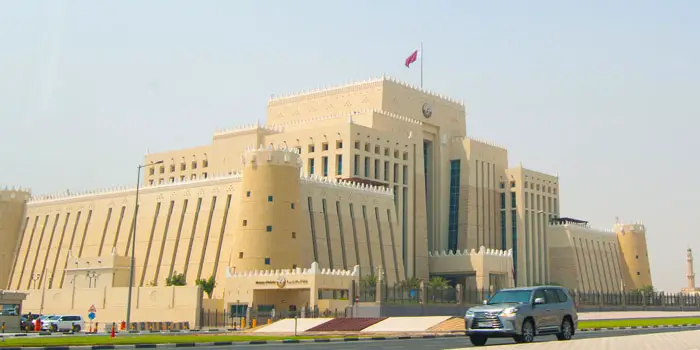
The Ministry of Interior was formed in 1970 according to decree No. (5) for the year 1970 stipulating the functions of the country’s ministries and other government organizations.
MOI Qatar’s functions and missions include providing peace and security and organizing police forces guaranteeing the protection of national security and maintaining the safety and security of nationals and expatriates.
Metrash was originally introduced in 2006 as an electronic service for mobile users only, where upon subscription, residents could receive SMS messages regarding a traffic violation, RP expiry, license expiry etc.
In the initial years, the service was not very popular as the registration was complicated and needed to access the MOI Qatar self-service kiosks. The process has been simplified in the last few years, and you can easily do it in 5 minutes with your smartphone, thereby achieving great popularity.
Today app has over 2 million active users, and they can access more than 250 services on the app 24 hours a day.
New Features of Metrash app
The new version of the app comes with a variety of new features:
- Security Services: Users now have access to a wide range of services for security departments.
- GCC services: The app will allow Gulf nationals to renew ID cards, and request replacements for damaged or lost cards.
- Personal Authorization: The update will allow users to grant permission to another person to perform specific services on their behalf, with the option to set a time limit.
- Family Authorization: Users can allow a family member to perform services on their behalf, with a set time frame for authorization.
- Profile: Users can easily view their digital wallets with an improved, user-friendly layout.
- Certificates: Users can request and reprint various types of certificates.
- Inquiries: Users can check details on individuals sponsored, travel history, companies, vehicles, visas, good conduct certificates, and travel restrictions.
Metrash Helpline
For technical issues related to Metrash, you can contact the MOI helpline on 2342000 or email at: [email protected]
The Government Contact Center, which offers 24-hour customer service to citizens and residents, can be reached via telephone at 109 (inside Qatar) or +974-44069999 or by fax at 44069998, or by live chat on the Hukoomi website. The e-mail address is [email protected].
FAQ on Metrash Mobile App
What to do if I forget the Metrash password?
You can click on “Forget password?” on the login screen and follow the steps to reactivate the service.
How many devices can I activate Metrash?
You can activate the Metrash app on up to two devices under one Qatar ID.
What if my phone is not under my Qatar ID?
You have to contact your service provider (Ooredoo or Vodafone) and check about transferring the phone to your QID, or else you have to get another SIM card.
Is the Metrash app required for children?
No, Metrash is not required for children below 18 years.
How can I get assistance for Metrash app issues?
For support on Metrash, residents can contact the 24-hour call centre: 2342000 or email MOI Qatar at: [email protected]
Can visitors to Qatar install Metrash?
No, it is a requirement that you should have Qatar ID to register for the Metrash app.
What payment methods are available on Metrash?
Metrash supports Credit card payment, Debit card payment, Apple Pay, and Direct debit through bank (only for companies).
How can companies activate direct debit account payments for Metrash?
The company representative has to go to Qatar National Bank (Company services) and apply for the Metrash service.
What is the refund process in case of an error in paid service?
In case of an error in paid service, a refund request will be submitted automatically to the bank. Transaction time is based on the bank process.
How can I change the Metrash app language?
Inside the app, click on the top-right icon. Scroll down to the last option named “Settings”. Click on “Application Language”.
Related Articles:
- Al-Adeed Service On Metrash To File Anonymous Complaints
- Qatar Family Visit Visa Requirements and How To Apply
- How To Renew Your Vehicle Istimara Online
- How To Get NOC From Metrash
- How To Get Driving License NOC On Metrash
Copyright © DohaGuides.com – Unauthorized reproduction of this article in any language is prohibited.
why not opening metrash 2
Hi DG Team,
Can you please advise how to download payment receipt from metrash2.
Hi Chetan, Usually payment receipt comes to your email. If not call the Metrash helpdesk on 109.
I activated Metrash2 using activaton Part1 & Part2. Should I keep this codes for future reference or can I delete it?
Thanks
Hi Din, You can delete them. These are for one time use only.
hi, i am trying to activate my Metrash2.
i send the message to 92992 twice, but i dont receive any link/code.
what should i do now?
thank you
Hi Ivan, Please call 109.
Hello,
Thank you for a very nice guide you have. Surely it has helped a lot.
Can dependents (wife and daughter) register for Metrash2?
Thanks.
Hi Haneen, Yes, they can. But the mobile number (SIM card) they are using should be under their name. There may be restrictions if your daughter is a minor.
Hello!I can’t find where is travel ban?in metrash 2
Hi Fatima, Here is how you can check: https://www.dohaguides.com/check-travel-ban-in-qatar/
I can’t loging metresh2 because it was registered with my previous mobile number then that number are already terminated from my QID then if I try to register the metresh2 with my new number but it’s replies that you already registered in metresh with onether number. Please send from registered phone or resend that request after changing your phone using moi website ” please assist to solve this issues
Hi Ishwor, Please call the helpline on 109.
Before my phone damage and now I have new sim and mobile but this mobile inside not working old Metrash 2 how can do open this app please give me some tips sir.mam.
Hi Dipendra, For assistance please call 109.
I can’t login Metrash2 because It was registered with my previous numbers then that numbers are already terminated from my QID then if I try to register the Metrash2 with my new number but its replies that “You already registered in Metrash with another number. Please send from registered phone or resend the request after changing your phone using MOI website” please assist to solve this issue.
Hi Shiva Kumar, You can change Metrash mobile number using MOI website. The process is explained in the above article. Or else you can call 109.
How to registered national address
Hi Kebeer, You can do it on your Metrash app.
After pressing login button the login remains unresponsive. What will be the issue ?
Hi Biju, Hope your issue is resolved. Call 109 if you still face the problem.
am having issue with my metrash2 it’s not working on my phone why
Hi Nwaka, Please call 109 for Metrash technical help.
Metrash 2 old number registered forget new number se register kar raha hoon otp nahi araha hai mobile old hi hai number Naya hai Kya Karen please help me
Hi Mohammad, 109 call kee jiye. Aap unse Hindi mein bhi baat kar sakte hain.
my metrash2 otp code is not coming
Hi Naseer, Please call 109.
My Metrash2 is not working because I changed mobile number, please help me sir/ma’am how to arrange my new mobile number so that my Metrash2 will activate
Hi Mohammad, You can change the number on the MOI website. Please see steps mentioned in this article (How to change mobile number in Metrash).
Hello I am Karim ullah, how can I change my mobile number in metrash2 my old mobile number has been blocked.
Hi Karim, You can do it from the Ministry of Interior website. Steps are already explained in this article. Please check the article again.
Hi.. This is pawan.. My Qatar ID was expire… So i need metrash2 service for changing employee.. How can i connect to metrash2..
Hi Pawan, Please call 109.
Sir I want to change my Mobile number in methraj 2
Hi Sovit,
Go to the Ministry of Interior Website.
Click on the “Inquiries” icon.
Go to Metrash Page.
Click on “Metrash for Individuals”
Enter your QID and the new mobile number.
Choose language, and enter the CAPTCHA code.
Click “Change Number”
Hi! I just wanna ask about QID Renewal in Metrash2. I am personally renewing my QID from Metrash2. It says, invalid QID. How come? Is there any problem? Thank You.
Hi Anna, The QID has to be renewed from the sponsor’s Metrash. QID holder cannot renew their own ID.
l am having problems to log in to my Metrash2 after forget password
Hi Mthandazo, Call 109. They will help you.
Why my matrash 2 not open after forgot password
Hi Md, Please call 109.
What’s the reason why my QID and mobile number is not matched in my metrash2?
Hi Estella, It may happen if you have purchased your SIM card using your passport number (instead of QID). If that is the case, you should contact your mobile phone company (Ooredoo or Vodafone). If that is not the case you can call Metrash helpline at 109.
My phone number active Matrash 2 please
Hi Md Amdadul Haque, If you are facing any technical error, please contact Metrash support on 109.
Hi, my mobile number doesn’t receive OTP to activate metrash2. Please what can I do? How much is the sms charges for 92992 text? I have 5 riyal flex credit units.
Hi Felix, SMS incoming is free inside Qatar. May be there is something wrong with your installation. Please call 109.
Register metrash2