
Doha Guides Team regularly reviews this article to ensure the content is up-to-date and accurate. The last editorial review and update were on 13 November 2025
Metrash is a mobile application provided by Qatar’s Ministry of Interior (MOI) that allows residents to access a wide range of government services conveniently from their smartphones. From renewing your Qatar ID to checking traffic violations, Metrash makes everyday administrative tasks quick and easy.
To ensure uninterrupted access, it’s important that your registered mobile number in Metrash is accurate and up to date. Many government services send verification codes or notifications to this number, and using an old SIM could prevent you from logging in or completing certain services.
This guide explains step by step how to change your mobile number in the Metrash app through the MOI website.
Steps to Change Mobile Number in Metrash
Follow these simple steps to update your number on the MOI Qatar Metrash platform:
Step 1: Visit the Ministry of Interior Website
Start by accessing the Ministry of Interior (MOI) website through your web browser.
Step 2: Click on the “Inquiries” Icon
Once on the MOI website, locate and click on the “Inquiries” icon. This will lead you to various inquiry services provided by the Ministry.
Step 3: Go to Metrash Page
Within the “Inquiries” section, navigate to the Metrash page. This is where you’ll find services related to the Metrash mobile application.
Step 4: Click on “Metrash for Individuals”
Find and click on the option for “Metrash for Individuals.” This will take you to the individual user services section.
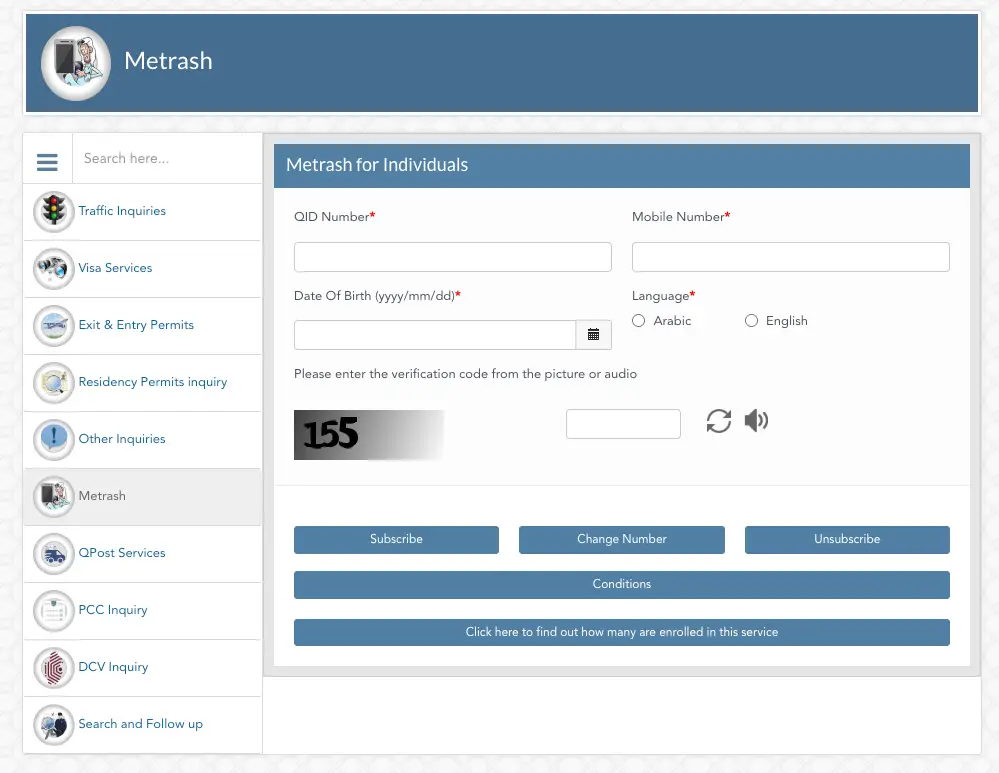
Step 5: Enter Your QID and New Mobile Number
On the Metrash for Individuals page, you’ll be prompted to enter your Qatar ID (QID) number, date of birth, language, and the new mobile number you wish to update.
Step 6: Choose Language and Enter CAPTCHA Code
Select your preferred language from the options provided and enter the CAPTCHA code displayed on the screen. This helps ensure security and verifies that you’re not a robot.
Step 7: Click “Change Number”
Once you’ve entered all the required information, click on the “Change Number” button to submit your request.
That’s it! Your request to change your mobile number in Metrash has been successfully submitted. You can also utilize the same page for subscribing or unsubscribing to various services offered through Metrash.
Additional Notes
- You can also use this page to subscribe or unsubscribe from specific Metrash services.
- Always ensure your mobile number is linked to your QID to avoid issues with verification.
- If you face difficulties, visit the nearest MOI Service Centre for assistance.
By keeping your Metrash account updated with your current mobile number, you’ll continue to enjoy seamless access to MOI services anytime, anywhere.
Related Articles:
- How To Register Metrash On Your Phone
- How To Get NOC From Metrash
- How To Get Driving License NOC On Metrash
- How to Get Qatar Return Permit for Overstay or Lost QID
- Doha Metro Map, Stations, Timings, Ticket Prices: Guide
- How To Renew Your Vehicle Istimara Online
Copyright © DohaGuides.com – Unauthorized reproduction of this article in any language is prohibited.

Aneesh, the Founder & Editor of DohaGuides holds a Master’s Degree in Communication & Journalism, and has two decades of experience living in the Middle East. Since 2014, he and his team have been sharing helpful content on travel, visa rules, and expatriate affairs.
i m not recieving otp to change number
Can i change my number in metrash this my new number 74093902
cheng my mobile number
cheng my number
Why Metrash 2 number and metrash sms number is showing different?
what to do if I cannot find my contract in MOL.
It says no record found
Hi Bemilie, Please contact with your employer or employer’s PRO to make sure they have uploaded the contract.
what to do if you went through all the steps and entered a wrong number and noticed after submitting